Accounting Multiple Orders

When working with webshop orders or other high-volume order sources, accounting orders individually can become time-consuming. The Accounting Multiple Orders function allows you to process many orders at once, helping you reduce repetitive work and speed up your daily accounting workflow.

When Should You Use This Function?

This feature is particularly useful for clients who regularly receive large numbers of orders from webshops, marketplaces, distributors, or other automated sales channels.

Instead of opening and accounting each order separately, you can select multiple orders and process them together in a single operation.

Opening the Accounting Multiple Orders Window

Navigate to the order management area and select Accounting Multiple Orders.

A modal window will open displaying all eligible orders that are currently available for accounting.

Accounting Multiple Orders window

Filtering Orders

Before selecting orders, you can use filters to narrow down the list.

  • Status – display only orders with a specific status such as Open or On Hold.
  • Account – display only orders belonging to a specific webshop, store, or account.

Using filters makes it easier to identify and process the correct group of orders.

Selecting Orders

Each order displayed in the list includes a checkbox.

You can select:

  • A single order
  • Multiple orders
  • An entire batch of orders

The selected orders will be included in the accounting process when you continue.

Processing the Selected Orders

Once you have selected the desired orders:

  1. Review your selection.
  2. Confirm the accounting process.
  3. The system will process all selected orders in a single operation.

This allows large numbers of orders to be accounted for significantly faster than processing them individually.

Example Workflow

Imagine your webshop generated 150 new orders over the weekend.

Instead of opening and accounting each order individually, you can:

  1. Open Accounting Multiple Orders.
  2. Filter the list by:
    • Status = Open
    • Account = Your Webshop
  3. Select all displayed orders.
  4. Run the accounting process.

All selected orders are then processed together, saving considerable time and effort.

Benefits

  • Process large numbers of orders quickly
  • Reduce repetitive manual work
  • Improve operational efficiency
  • Maintain consistent accounting workflows
  • Handle webshop orders more effectively

The Accounting Multiple Orders function is especially valuable for businesses that process a high volume of orders every day and want to streamline their accounting operations.

Tax Base Royalty

When a tax is applied to a royalty statement, the system needs to know: what amount should the tax be calculated on? This is called the tax base.

For most cases, the answer is simple — tax is calculated on what gets paid out. But some tax rules work differently. French social contributions, for example, are calculated on the royalties an artist earned in the current period, regardless of whether anything is actually paid out. An artist with an unrecouped advance may receive nothing — and still owe social contributions on the royalties they generated.

The Tax Base Royalty configuration lets you define exactly which elements of a statement should be used as the base for a given tax group.

Context: In most cases, you will not need to change this setting. The default behaviour — calculating tax on the final payable amount — is correct for standard VAT and most withholding taxes. The Tax Base Royalty tab is primarily needed for jurisdictions with specific social contribution rules, such as France.

► Where to Find This

Go to SETTINGSAccounting in the left sidebar → click the TAXES tab → locate the Tax Groups (Select To Edit) panel on the right. Click the edit icon next to a tax group to open its configuration dialog.

► How It Works

The dialog has two tabs:

  • Select Taxes — choose which individual taxes (VAT, withholding, social contributions, etc.) are part of this tax group.
  • Tax Base Royalty — define what the taxes in this group are calculated on.

On the Tax Base Royalty tab, you select which financial elements should be included in the tax base. The system will sum up all selected elements and use the result as the base for calculating the taxes in this group.

Important: Either use Statement Net Amount on its own, or select a combination of individual elements below it — not both. Selecting Statement Net Amount automatically disables all other options.

► Statement Net Amount

This is the default and simplest option. When selected, the tax is calculated on the final payable result of the entire statement — what the artist actually receives after all advances, costs, and deductions have been applied.

Use this for standard VAT or withholding taxes that should only apply when something is actually being paid out. If the statement is negative or zero, no tax is calculated.

► Contract Elements

These settings let you build a custom tax base from specific components of each contract. The system calculates the selected elements for each contract and adds them together across the whole statement.

  • Royalties
    Includes the gross royalties earned in the current period — from physical sales, digital, licensing, publishing, neighbouring rights, and performance income. This is calculated before any advances or costs are deducted.
    Use this for social contributions that must be calculated on what was earned, not what was paid — for example, French CSG, CRDS, and Prélèvement de solidarité.
  • Advances
    Includes advance recoupment amounts in the tax base. These are amounts previously paid to the artist that are being recouped from the current period’s earnings.
    Use this if your tax rules treat advance recoupments as part of the taxable base.
  • Reserve
    Includes reserve movements — amounts added to or released from reserve. Reserves are amounts withheld as a buffer against potential returns.
    Use this if reserve releases are considered a taxable income event under your applicable rules.
  • Costs
    Includes costs charged against the contract (for example, recording or marketing costs that are recouped from royalties).
    Use this if costs are part of the gross base before deduction under your applicable tax rules.
  • Other Income
    Includes any additional income items posted to the contract that fall outside the standard royalty categories.
    Use this if other income types are subject to the same tax treatment as royalties.
  • Contract Total
    Uses the full net result of each individual contract as the tax base — all elements combined. Selecting this automatically deactivates the other Contract Elements options, as it already represents their combined result. Deselecting it re-enables the individual options for manual selection.
    Use this if you want to base taxes on each contract’s net position rather than selecting specific elements.

► Statement Elements

These settings add statement-level components to the tax base — items that are posted directly to the statement rather than to an individual contract.

  • Royalty Amount
    The total royalty amount for the current period across all contracts, excluding any opening balance carried forward from a previous period. This reflects what was earned this period only.
    This is the most common choice for French-style social contributions, where the tax base is the current-period result only.
  • Royalty Amount Including Opening
    The total royalty amount for the current period plus the opening balance carried forward from the previous period. This reflects the artist’s cumulative position.
    Use this if the tax base should take prior-period balances into account.
  • Additions
    Includes manual additions posted directly to the statement in the tax base.
    Use this if manual additions represent income that is subject to the same tax treatment.
  • Deductions
    Includes manual deductions posted to the statement. Since deductions are negative amounts, including them will reduce the tax base.
    Use this if manual deductions should reduce the taxable base.

► Options

  • Negative Tax Base from Prior Period
    When enabled, a negative tax base from the previous period is carried forward and offsets the current period’s tax base before taxes are calculated. If last period’s base was negative, it reduces what gets taxed this period.
    When disabled, each period stands alone — a negative base from a previous period has no effect on the current one.
    Leave this disabled for French social contributions, where contributions are due on current-period royalties regardless of prior deficits.
  • Opening Balance = Net Plus Taxes
    When enabled, the balance carried forward to the next statement period includes both the net amount and any taxes already deducted. This prevents taxes from being counted twice when a statement ends negative after a tax deduction.
    Enable this when taxes are deducted from a statement that then ends in a negative balance, to ensure the tax deduction is correctly reflected in the carry-forward.
Example — French Social Contributions: To calculate CSG, CRDS, and Prélèvement de solidarité on current-period royalties only (regardless of advances or prior deficits), select Royalties under Contract Elements, or Royalty Amount under Statement Elements. Leave Negative Tax Base from Prior Period unchecked.

► French UI Reference

If you’re working with a French-language interface or supporting French clients, here’s how these settings map to the French labels:

English (this article) French UI label
Statement Net Amount Redevance montant net
Advances Avances
Royalties Redevance
Reserve Réserves
Costs Charges
Other Income Autres Revenus
Contract Total Total contrat
Additions Additions
Deductions Déductions
Royalty Amount Montant des redevances
Royalty Amount Including Opening Montant des redevances incluant le solde d’ouverture
Negative Tax Base from Prior Period Base négative de la période précédente
Opening Balance = Net Plus Taxes Solde d’ouverture = Montant payable plus taxes

Sobre desarrollos de funciones y programación personalizada

En details, nos comprometemos a mejorar continuamente nuestro servicio y tu experiencia de usuario con nuevas funciones y flujos de trabajo más simples.

Valoramos las ideas y la inspiración que comparten tanto nuestro equipo como nuestros clientes. Sin embargo, responder a los distintos modelos de negocio y flujos de trabajo de la industria musical hace que crear un servicio universal sea complejo. Por eso, consideramos con cuidado cada nuevo desarrollo y sus implicaciones para todos nuestros valiosos clientes en todo el mundo.

Para responder a estas necesidades diversas, hemos creado cuidadosamente un sistema llamado “$$$” (pronunciado “¡dinero mágico!”).

Cuando los clientes solicitan una función para que se trate como prioridad, esto les permite contribuir a los costes de programación, asegurando una priorización eficaz de las tareas y manteniendo al mismo tiempo una hoja de ruta equilibrada que beneficie a todos nuestros usuarios.

Aquí tienes un resumen de cuándo y cuánto se pedirá a los clientes que contribuyan a nuestros costes de programación:

  1. Mejoras generales: Si es una mejora general que creemos que beneficiará a todos los clientes, la incluiremos en nuestro calendario de programación, y se ofrece sin coste como parte de nuestro desarrollo continuo. Esto también incluye la corrección de errores, que siempre tiene la máxima prioridad. No se cobrará a los clientes por estas mejoras.

  2. Prioridad en mejoras generales: Si es una mejora general, pero el cliente quiere darle prioridad para que nuestros programadores trabajen en ella, el cliente tendrá que pagar el 50 % de los costes de programación después de recibir un presupuesto previo.

  3. Solicitudes especiales de clientes: Si no es una mejora general sino una solicitud especial de un cliente, podríamos incluirla en nuestro calendario de programación, y el cliente tendrá que pagar el 50 % de los costes de programación después de recibir un presupuesto previo.

  4. Prioridad en solicitudes especiales de clientes: Si no es una mejora general, y el cliente desea priorizarla por encima de otras tareas para nuestros programadores, el cliente será responsable de pagar el 100 % de los costes de programación después de recibir un presupuesto previo.

Con estas pautas, buscamos equilibrar las solicitudes de los clientes con nuestros esfuerzos continuos para mejorar nuestros servicios en beneficio de todos nuestros valiosos clientes.

Bildschirmfoto 2023-07-27 um 18.25.14.png

Informazioni sugli sviluppi delle funzionalità e sulla programmazione personalizzata

In details, ci impegniamo a migliorare continuamente il nostro servizio e a rendere migliore la tua esperienza utente con nuove funzioni e flussi di lavoro più semplici.

Diamo valore alle idee e agli spunti condivisi sia dal nostro team sia dai clienti. Tuttavia, rispondere ai diversi modelli di business e flussi di lavoro del settore musicale rende complesso creare un servizio universale. Per questo, valutiamo con attenzione ogni nuovo sviluppo e le sue implicazioni per tutti i nostri clienti nel mondo.

Per rispondere a queste esigenze diverse, abbiamo creato con cura un sistema chiamato “$$$” (si pronuncia “magical moolah!”).

Quando i clienti richiedono che una funzione venga trattata come prioritaria, questo permette loro di contribuire ai costi di programmazione, garantendo una prioritizzazione efficace delle attività e mantenendo allo stesso tempo una roadmap equilibrata che va a beneficio di tutti i nostri utenti.

Ecco una panoramica di quando e quanto ai clienti verrà chiesto di contribuire ai nostri costi di programmazione:

  1. Miglioramenti generali: Se si tratta di un miglioramento generale che riteniamo utile per tutti i clienti, lo includeremo nella nostra pianificazione di programmazione e sarà fornito gratuitamente come parte del nostro sviluppo continuo. Questo include anche la correzione dei bug, che ha sempre la massima priorità. Ai clienti non verrà addebitato alcun costo per questi miglioramenti.

  2. Priorità sui miglioramenti generali: Se si tratta di un miglioramento generale, ma il cliente vuole dargli priorità affinché i nostri programmatori ci lavorino, il cliente dovrà pagare il 50% dei costi di programmazione dopo aver ricevuto un preventivo iniziale.

  3. Richieste speciali del cliente: Se non si tratta di un miglioramento generale ma di una richiesta speciale di un cliente, potremmo includerla nella nostra pianificazione di programmazione e al cliente sarà richiesto di pagare il 50% dei costi di programmazione dopo aver ricevuto un preventivo iniziale.

  4. Priorità sulle richieste speciali del cliente: Se non si tratta di un miglioramento generale e il cliente desidera dargli priorità rispetto ad altre attività dei nostri programmatori, il cliente sarà tenuto a pagare il 100% dei costi di programmazione dopo aver ricevuto un preventivo iniziale.

Con queste linee guida, cerchiamo di bilanciare le richieste dei clienti con il nostro impegno costante per migliorare e sviluppare i nostri servizi a beneficio di tutti i nostri clienti.

Bildschirmfoto 2023-07-27 um 18.25.14.png

Über Funktionsentwicklungen und individuelle Programmierung

Bei details arbeiten wir ständig daran, unseren Service zu verbessern und dein Nutzererlebnis mit neuen Funktionen und einfacheren Abläufen zu optimieren.

Wir schätzen die Ideen und Anregungen, die sowohl unser Team als auch unsere Kunden mit uns teilen. Gleichzeitig ist es komplex, einen universellen Service zu schaffen, der zu den unterschiedlichen Geschäftsmodellen und Abläufen in der Musikbranche passt. Deshalb prüfen wir jede neue Entwicklung sorgfältig und berücksichtigen dabei die Auswirkungen auf alle unsere geschätzten Kunden weltweit.

Um diesen unterschiedlichen Anforderungen gerecht zu werden, haben wir ein System namens “$$$” entwickelt (ausgesprochen „magical moolah!“).

Wenn Kunden darum bitten, dass eine Funktion mit Priorität bearbeitet wird, können sie sich damit an den Programmierkosten beteiligen. So ist eine wirksame Priorisierung von Aufgaben möglich, während wir gleichzeitig eine ausgewogene Roadmap beibehalten, von der alle unsere Nutzer profitieren.

Hier ist ein Überblick darüber, wann und in welcher Höhe Kunden gebeten werden, sich an unseren Programmierkosten zu beteiligen:

  1. Allgemeine Verbesserungen: Wenn es sich um eine allgemeine Verbesserung handelt, von der aus unserer Sicht alle Kunden profitieren, nehmen wir sie in unseren Entwicklungsplan auf. Sie ist dann als Teil unserer laufenden Entwicklung kostenlos. Dazu gehört auch die Behebung von Fehlern, die immer die höchste Priorität hat. Kunden werden für diese Verbesserungen nicht belastet.

  2. Priorität für allgemeine Verbesserungen: Wenn es sich um eine allgemeine Verbesserung handelt, der Kunde aber möchte, dass unsere Programmierer ihr Priorität geben, muss der Kunde nach einem vorab erhaltenen Kostenvoranschlag 50 % der Programmierkosten zahlen.

  3. Besondere Kundenanfragen: Wenn es sich nicht um eine allgemeine Verbesserung, sondern um eine spezielle Anfrage eines Kunden handelt, nehmen wir sie möglicherweise in unseren Entwicklungsplan auf. Der Kunde muss dann nach einem vorab erhaltenen Kostenvoranschlag 50 % der Programmierkosten zahlen.

  4. Priorität für besondere Kundenanfragen: Wenn es sich nicht um eine allgemeine Verbesserung handelt und der Kunde wünscht, dass unsere Programmierer sie vor anderen Aufgaben priorisieren, muss der Kunde nach einem vorab erhaltenen Kostenvoranschlag 100 % der Programmierkosten zahlen.

Mit diesen Richtlinien möchten wir Kundenanfragen mit unseren laufenden Bemühungen in Einklang bringen, unsere Services zum Vorteil aller unserer geschätzten Kunden zu erweitern und zu verbessern.

Bildschirmfoto 2023-07-27 um 18.25.14.png

À propos des développements de fonctionnalités et de la programmation personnalisée

Chez details, nous nous engageons à améliorer en continu notre service et à rendre ton expérience utilisateur meilleure grâce à de nouvelles fonctionnalités et des flux de travail plus simples.

Nous apprécions les idées et l’inspiration partagées par notre équipe et par nos clients. Cependant, répondre aux différents modèles économiques et flux de travail de l’industrie musicale rend la création d’un service universel complexe. C’est pourquoi nous examinons avec soin chaque nouveau développement et ses implications pour tous nos précieux clients dans le monde entier.

Pour répondre à ces besoins variés, nous avons créé avec soin un système appelé “$$$” (prononcé « magical moolah! »).

Quand des clients demandent qu’une fonctionnalité soit traitée en priorité, cela leur permet de contribuer aux coûts de programmation, afin d’assurer une priorisation efficace des tâches tout en maintenant une feuille de route équilibrée qui profite à tous nos utilisateurs.

Voici un aperçu des cas où les clients devront contribuer à nos coûts de programmation, et du montant demandé :

  1. Améliorations générales : S’il s’agit d’une amélioration générale qui, selon nous, profitera à tous les clients, nous l’ajouterons à notre planning de programmation, et elle sera fournie gratuitement dans le cadre de notre développement continu. Cela comprend aussi la correction des bugs, qui a toujours la priorité la plus élevée. Les clients ne seront pas facturés pour ces améliorations.

  2. Priorité sur les améliorations générales : S’il s’agit d’une amélioration générale, mais que le client veut définir une priorité pour que nos programmeurs travaillent dessus, le client devra payer 50 % des coûts de programmation après avoir reçu un devis préalable.

  3. Demandes spéciales de clients : S’il ne s’agit pas d’une amélioration générale mais d’une demande spéciale d’un client, nous pourrons l’ajouter à notre planning de programmation, et le client devra payer 50 % des coûts de programmation après avoir reçu un devis préalable.

  4. Priorité sur les demandes spéciales de clients : S’il ne s’agit pas d’une amélioration générale, et que le client souhaite la faire passer avant les autres tâches de nos programmeurs, le client devra payer 100 % des coûts de programmation après avoir reçu un devis préalable.

Avec ces règles en place, nous cherchons à équilibrer les demandes des clients avec nos efforts continus pour faire évoluer et améliorer nos services au bénéfice de tous nos précieux clients.

Bildschirmfoto 2023-07-27 um 18.25.14.png

About feature developments and custom programming

At details, we are committed to continuously improving the platform through new features, workflow enhancements, and ongoing technical improvements.

Many of the features available today originated from suggestions made by our clients. We greatly value this feedback, as it helps us develop solutions that address real-world challenges faced by record labels, distributors, publishers, booking agencies, and other music industry professionals.

At the same time, every client operates differently and has unique requirements. While some requested features benefit the entire user community, others may be highly specific to a particular workflow, business model, or market.

To ensure a fair and sustainable development process, we evaluate all requests based on their overall benefit, technical complexity, and impact on our product roadmap. In some cases, clients may choose to contribute towards development costs in exchange for prioritization or implementation of client-specific functionality.

Feature Request Priority Matrix

The following guidelines explain how feature requests are typically handled:

  1. General Improvements
    If a requested feature is considered beneficial for a broad range of clients and aligns with our long-term product strategy, it will be added to our development roadmap and implemented at no additional cost. Bug fixes are always treated as a priority and are never billed to clients.
  2. Priority on General Improvements
    If a feature is considered a general improvement but a client wishes to accelerate its development and prioritize it ahead of other scheduled work, the client may be asked to contribute up to 50% of the estimated development costs. A quotation will always be provided beforehand.
  3. Client-Specific Features
    If a request addresses a specific workflow, integration, report, or functionality that primarily benefits a single client or a limited group of users, we may still choose to implement it within the platform. In such cases, the client may be asked to contribute up to 50% of the estimated development costs, subject to prior approval.
  4. Priority on Client-Specific Features
    If a client-specific feature requires immediate attention or needs to be developed ahead of other planned work, the client may be responsible for up to 100% of the associated development costs. A detailed quotation will be provided before any work begins.

All development contributions are agreed upon in advance and require client approval before implementation starts.

This approach allows us to maintain a balanced product roadmap, continue investing in the platform, and ensure that development resources are allocated fairly across our global client base.

Should you have any questions regarding a feature request, custom development project, or development quotation, please do not hesitate to contact our team.

Customize INVOICE ITEMS and INVOICE LINE GROUPS

Each Booking Agency has their own traditions, wording and invoicing workflows.

DETAILS offers you to create presets not only of what you invoice, but also how you want to bundle them in your own special deal arrangements.

Previously we had three fixed deal types to choose from:
”Standard Deals”, ”All-In Deal” and ”Door Deal” to choose from. With the 02 2015 Update you are now able to create your very own deal arrangements and modify them anyway you need.

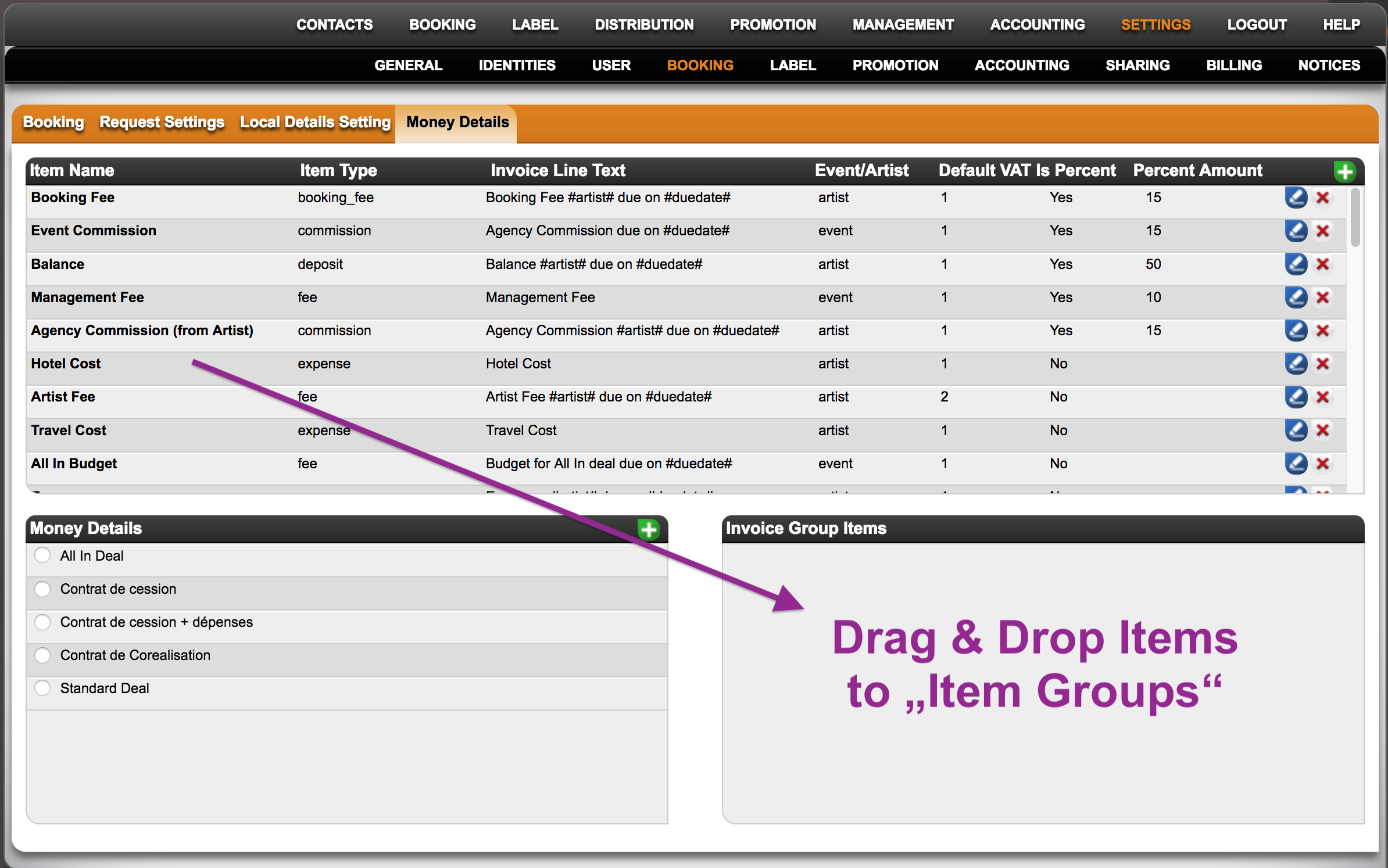
To do this go to SETTINGS > BOOKING > MONEY DETAILS


You will find three boxes for settings:

1. INVOICE ITEMS (i.e. any item you want to include in an invoice or deal, like Artist and Booking Fees, Travel Expenses, etc.)
Find out how to create or edit INVOICE ITEMS HERE

Here is how to set automatic due dates for Money Details

2. INVOICE LINE GROUPS (i.e. “deal types”)
Find out how to create or edit INVOICE LINE GROUPS HERE.

3. Invoice Group Items (i.e. selection of INVOICE ITEMS for a specified INVOICE LINE GROUP).
To populate INVOICE LINE GROUPS with INVOICE ITEMS, select a group first and then simply drag & drop items into the “Invoice Group Items” box.
NOTE: The Sequence in which you ”add” INVOICE ITEMS to the Group will be the sequence in which the INVOICE LINE GROUPS will appear whenever it’s selected in a booking!

Set up a ROYALTY CONTRACT – ARTIST RELEASE

This tutorial explains how to set up a royalty contract based on artists, for example for artist albums. If you want to create a royalties account based on tracks, for example for compilations see SET UP NEW ROYALTY CONTRACT – COMPILATION.

Watch a TUTORIAL video about how to create ROYALTY ACCOUNTS and CONTRACTS for artist releases here.

”Shortcuts:”
* Contract and item share on 50 / 50 deals

First go to LABEL / ROYALTY, click on the account you want to set up a new contract for and go to the subtab CONTRACTS. Then click [+] to type in CONTRACT NAME and enter the percentages of physical, digital and licensing income, confirm with OK.
You will be directed to the CONTRACT’s subtab CONTRACT ITEMS where you can add related items either with the auto fill option or manually.

To use auto fill first select the release that is part of this contract in the RELEASE box as described above.
The AUTO FILL FROM RELEASE (ARTIST ALBUM) button now adds all related products and tracks with their specific rata to this contract.

On the next subtab ROYALTY RATES you can see the rates you have previously entered. Here you are able to adjust or complete these by clicking edit in the particular lines or adding additional options by clicking the green PLUS.

You can enter detailed royalty settings like territories, accounts, deductions, adjustments etc. and add multiple royalty rates, e.g. different royalty rates on downloads and streaming.

The last step is to set up the contract’s RECOUPABLES. On the subtab RECOUPABLES you can manage all these settings as well as reserves.

First choose a RECOUPABLE TYPE from the drop down menu.
There are three options:

1) If advance payments and / or other particular recoupable costs are agreed on in your royalty contract, choose RECOUPABLE BY GROUPS.

Now click [+] on top right of the Costgroup Setup box and choose the cost group and the split e.g your contract includes an advance payment which is paid against royalties 100% you add the costgroup advance and give it a split of 100.
If your contract also includes a recoupable split of 50% on remix costs, just add the cost group Remix and give it a split of 50.

100% of the advance payment and 50% of the remix costs will now be paid against royalties.

It is essential that your costs have the correct COST GROUP. details automatically identifies the costs by its cost group so that these will be accounted according to the above settings.

2) If all RELEASE RELATED COSTS and all PRODUCT RELATED COSTS are recoupable costs (e.g. 50/50 deal), choose GENERAL RECOUPABLES and type in the split.

Please note that advance payments have a default split of 100%. You can adjust the amount if necessary once it’s been accounted in the Recoupables Box right next to the Setup box or while you account the advance payment separately on RELEASE / COSTS.

3) If you do not have any RECOUPABLES included in your contract, choose NO RECOUPMENT.

To set up a reserve, just click [+] on top right of the Reserve Setup box and type in the percentage, the extra months amount as stated in your contract and choose a type whether accounted on net amount or by catalog number.

On the subtab STATEMENT HISTORY you will find an overview of past ROYALTY STATEMENTS created in details for this royalty contract.

On the subtab SPECIAL you find a special AUTO FETCH function for labels and suppliers which automatically adds related items to the contract.

To activate auto fetch for labels click [+] on top right of the box and choose label and the label you want to activate it for.
If you now click the button AUTO FETCH below the box, all related releases, products and tracks of the label will be added to the contract.

You can double check on the subtab contract items.

You can also activate auto fetch for suppliers. Suppliers can be assigned in the PRODUCTS / OVERVIEW subtab.
All products (and related tracks) assigned to this particular supplier will then automatically be added to the contract.

Now you have successfully set up your contract. Next steps will be:
IMPORT SALES
CREATE ROYALTY STATEMENT

How to copy contracts

Details provides a feature to help you set up contracts efficiently using the copy contract function. This allows you to replicate an existing contract, including all associated items such as repertoire, share, royalty, licensing, and recoupable rates.

Step-by-Step Guide

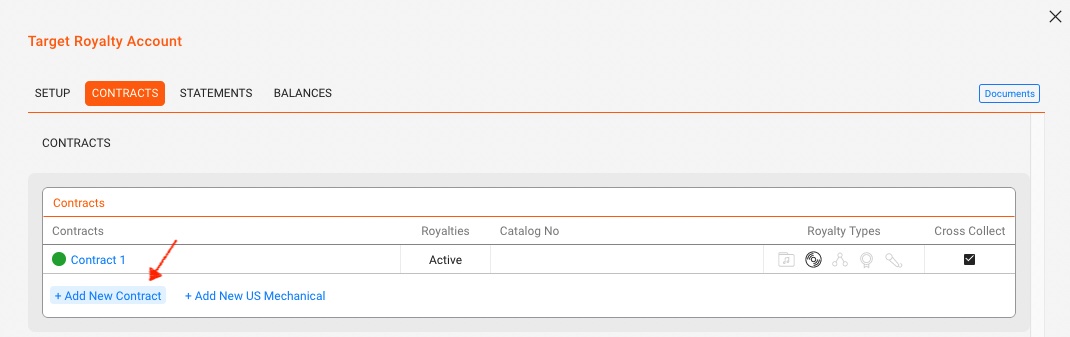
1. Navigate to the Target Royalty Account

Go to the royalty account where you want to add a new contract.

Open the Contracts subtab.

Click +Add New Contract to set up a new contract.


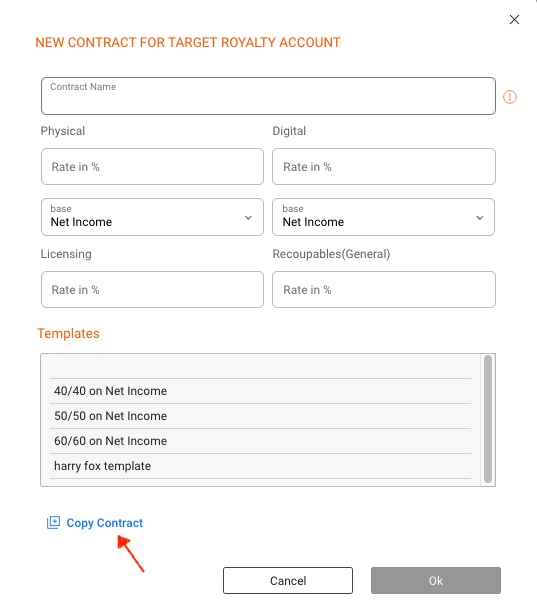
2. Initiate the Copy Contract Process

In the contract modal, click the COPY CONTRACT button.


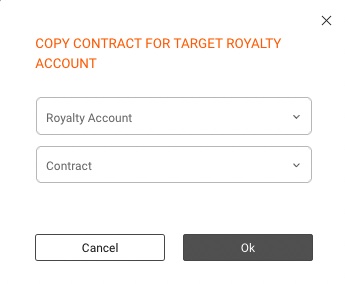
3. Select the Source Contract

Choose the ROYALTY ACCOUNT and the specific CONTRACT you want to copy.

Click OK to proceed.


4. Modify the New Contract (if needed)

The new contract will open, allowing you to make any necessary additional changes.

By following these steps, you can efficiently copy and modify contracts, ensuring accuracy and consistency across your royalty accounts.

For further guidance, read here how to create contract templates.