The Catalog is the foundation of repertoire management in details. It combines a music-specific track layer with a highly flexible product model that can represent physical items, digital goods, merchandise, tickets, and even services. This flexibility is a core differentiator from generic ERP systems that usually lack a track level.
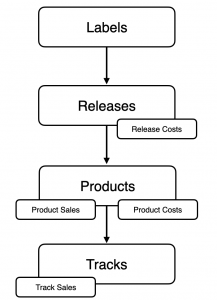
Key idea: Sales happen on Products and Tracks. For reporting, Releases compile these results together with the costs recorded on Releases and Products.
► Catalog hierarchy
Four levels
- Labels Host and unite multiple releases. Labels act as the organisational containers at the very top of your catalog structure.
- Releases Group products and tracks (albums, EPs, singles, compilations). Releases are organisational bundles and are not sold directly.
- Products The sellable items. Formats are configurable and customer-specific: physical (CD, vinyl), digital, web-shop items, tickets, or services (e.g., selling studio/programming time). Every product has a quantity, a price, and ideally an identifier (product code, barcode, catalogue number).
- Tracks The music-specific layer for individual recordings (rare in generic ERPs). This enables granular selling and accounting on single tracks.
Because details is product-agnostic, you can model anything you can sell.
► Sales & Costs
Where sales happen
- Product sales money is exchanged for a product (physical, digital, merch, ticket, service).
- Track sales money is exchanged for an individual track.
Releases are never sold; they aggregate the sales of their products and tracks for reporting.
Where costs live
- Release costs expenses affecting the whole release (e.g., artwork, promo agency, video shoot).
- Product costs expenses tied to a specific product (e.g., manufacturing, stickers, packaging, mechanicals).
► Getting catalog data into details
Entry modes
- Manual entry add data by hand.
- Spreadsheet import upload structured tables.
- Auto-Ingestion automate inbound sales/cost/order data from external sources; this is increasingly emphasised to reduce manual work.
Auto-Ingestion channels
- Webshops, Bandcamp, iTunes, Amazon, and others.
- details-to-details Connect automatic transfers when one details account invoices another.