In Excel, in order to properly format barcodes, a useful tip is to adjust EXCEL / FORMAT to the Custom format with 13x “0” for the barcode column.
This allows you to add the leading 0s in case of loss.
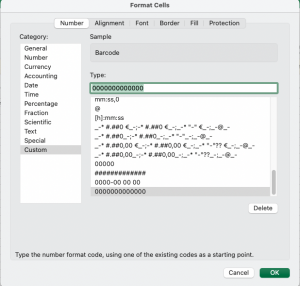
In Excel, in order to properly format barcodes, a useful tip is to adjust EXCEL / FORMAT to the Custom format with 13x “0” for the barcode column.
This allows you to add the leading 0s in case of loss.
This article explains how Formats and Format Groups work in details, how they impact royalty calculation, and how to configure them safely. It is written for admins who maintain the product catalog and royalty settings.
Note: Choose Digital or Physical for a product and stick to it. Format attributes (VAT, weight, reserves, etc.) drive logistics and royalty logic. Use Format Groups to apply the same royalty rule to several formats (e.g., all vinyl formats).
► Where to manage Formats
Go to CATALOG / PRODUCTS to assign a format to a product. To define or edit formats themselves, open LABEL / SETTINGS and manage your label s format list.
Formats are customizable per label. You can keep them minimal or very granular (e.g., separate entries for different vinyl sizes, CDs, merchandise, tickets).
► Digital vs. Physical a binding decision
When you create a product, you must decide whether it is Digital or Physical. After a product has transactions, do not switch its channel between Digital and Physical.
Why this matters: Digital vs. Physical sales are calculated under different royalty regimes (e.g., splits vs. percentage of PPD). Switching would retroactively change which rules apply and can corrupt statements.
You may still change within Physical formats (e.g., from one vinyl size to another) as long as this does not conflict with existing accounting or logistics constraints.
► Format fields & what they do
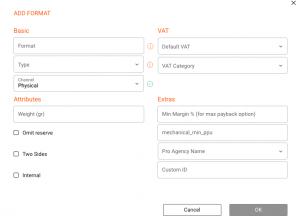
Cross border sales: VAT settings influence how invoices are calculated for shops in different countries. Configure defaults that match your typical tax treatment.
Define a default weight per format to support shipping cost estimates. Product level weight can override the format s default when needed.
Background: In traditional physical distribution, labels often held back part of the payout (e.g., 20 25%) to cover expected returns after the release date. Use Omit Reserve for formats where returns are unlikely (e.g., limited runs, tickets).
► Deleting formats

► Format Groups
Use Format Groups to bundle multiple formats that should share the same royalty rule. Example: a VINYL group that includes all vinyl formats (7 inch, 12 inch, LP, Double LP).
Tip: Keep the group names short and predictable. This makes it easy to target them in royalty rules and reports.
In LABEL / ROYALTY / SELECTED CONTRACT / ROYALTY RATES you can select a Format Group for Physical rate rules (Digital rules typically do not use format groups). This is where you apply common logic such as a discount on PPD or a reserve policy to all formats in the group.
► Best practices
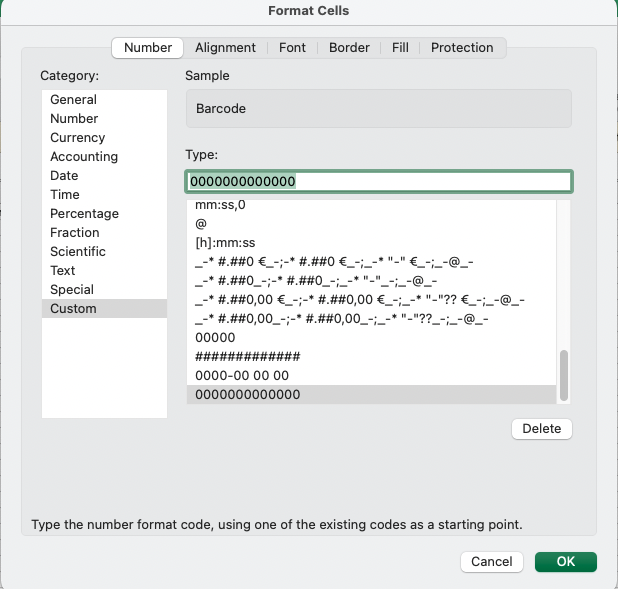
In Excel, in order to properly format barcodes, a useful tip is to adjust EXCEL / FORMAT to the Custom format with 13x “0” for the barcode column.
This allows you to add the leading 0s in case of loss.
This article explains how Formats and Format Groups work in details, how they impact royalty calculation, and how to configure them safely. It is written for admins who maintain the product catalog and royalty settings.
Note: Choose Digital or Physical for a product and stick to it. Format attributes (VAT, weight, reserves, etc.) drive logistics and royalty logic. Use Format Groups to apply the same royalty rule to several formats (e.g., all vinyl formats).
Where to manage Formats
Go to CATALOG / PRODUCTS to assign a format to a product. To define or edit formats themselves, open LABEL / SETTINGS and manage your label’s format list.
Formats are customizable per label. You can keep them minimal or very granular (e.g., separate entries for different vinyl sizes, CDs, merchandise, tickets).
Digital vs. Physical — a binding decision
When you create a product, you must decide whether it is Digital or Physical. After a product has transactions, do not switch its channel between Digital and Physical.
Why this matters: Digital vs. Physical sales are calculated under different royalty regimes (e.g., splits vs. percentage of PPD). Switching would retroactively change which rules apply and can corrupt statements.
You may still change within Physical formats (e.g., from one vinyl size to another) as long as this does not conflict with existing accounting or logistics constraints.
Format fields & what they do
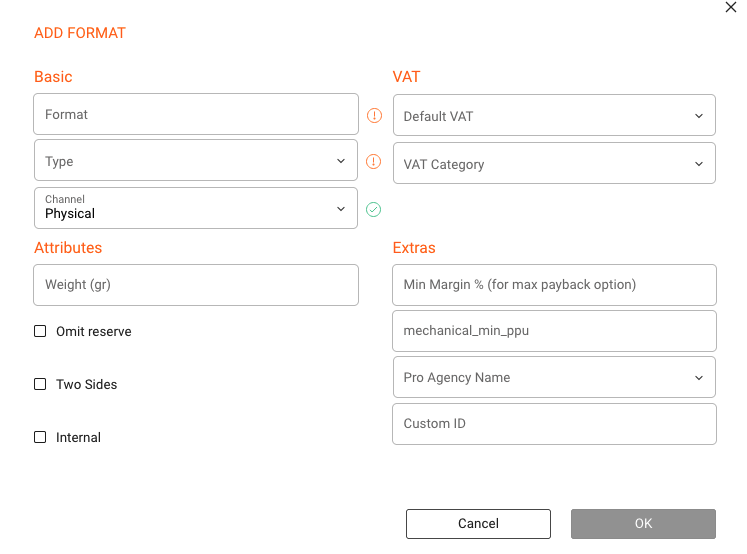
Cross border sales: VAT settings influence how invoices are calculated for shops in different countries.
Define a default weight per format to support shipping cost estimates. Product-level weight can override the format’s default.
Background: Used when returns are unlikely (e.g., limited editions).
Deleting formats

Format Groups
Use groups to bundle formats sharing the same royalty rules (e.g., VINYL group).
Tip: Keep group names short and consistent.
In LABEL / ROYALTY / CONTRACT / RATES, Format Groups are used for Physical royalty rules.
Best practices